

Description
Download Cok WhatsApp Recovery – Free Windows Backup & Recovery Tool
Overview – Why Cok WhatsApp Recovery Deserves a Look
Cok WhatsApp Recovery is a lightweight, trial‑version utility designed specifically for Windows users who need a reliable way to retrieve lost or deleted WhatsApp chats, media files, and backup data. Published by cok‑software on Softonic in February 2018, the program sits comfortably in the “Backup & Cloud Storage” category, promising a simple interface and a focused feature set that avoids the bloat often found in generic data‑recovery suites.
The current release, version 3.1, runs on any Windows system from Windows 2000 onward, making it accessible to both legacy machines and modern desktops. While the app is limited to English, its straightforward layout means language barriers are minimal for most users. As a trial version, Cok WhatsApp Recovery offers a glimpse of the full capabilities without requiring an upfront purchase, allowing you to test its effectiveness before committing to a license.
In a market saturated with “one‑size‑fits‑all” recovery tools, Cok WhatsApp Recovery distinguishes itself by concentrating solely on WhatsApp data. Whether you accidentally erased a conversation, lost a photo gallery after a phone reset, or need to extract a backup stored on your PC, this software aims to provide a secure, fast, and user‑friendly solution. The following sections dive deep into its core features, installation process, system compatibility, and the pros and cons that real‑world users have reported.
Key Features – What You Get with Cok WhatsApp Recovery
- Selective chat restoration – retrieve individual conversations or entire chat histories.
- Media file recovery – recover photos, videos, voice notes, and documents attached to chats.
- Support for multiple backup formats – works with both local device backups and cloud‑based exports.
- Preview before recovery – view recoverable items in a temporary window to avoid unnecessary restores.
- Simple one‑click recovery – minimal technical knowledge required to start the process.
- Secure data handling – all recovered files are saved locally on your PC without transmitting data online.
- Trial mode with functional core – allows you to test the main recovery functions before buying.
- Compatibility with Windows 2000 and newer – ensures even older systems can benefit from the tool.
Each feature is built around the principle of “recovery made easy.” The selective chat restoration lets you target only the messages you truly need, avoiding the hassle of importing entire backup files that may contain irrelevant data. Media recovery is especially valuable for users who store precious photos and videos within WhatsApp, as the tool can locate these files even when they’re buried deep inside encrypted backup containers.
The preview functionality acts as a safety net, giving you confidence that the files you’re about to restore are exactly what you expect. This reduces the risk of overwriting existing data or cluttering your device with duplicate content. Moreover, because the app runs entirely offline, it adheres to strict privacy standards—a crucial consideration when handling personal communications.
Installation & Usage – Step‑by‑Step Guide to Getting Started
Downloading the Installer
Begin by visiting the official Softonic page for Cok WhatsApp Recovery or the developer’s website. Click the “Download” button, which will retrieve a small executable file (typically under 15 MB). Because the program is a trial version, there’s no payment gateway involved; you’ll receive a fully functional installer ready for immediate use.
Running the Installer
Once the download completes, double‑click the .exe file. Windows may prompt you with a User Account Control (UAC) dialog asking for permission to make changes to your device. Accept the request to proceed. The installer will guide you through a standard wizard: accept the End‑User License Agreement (EULA), choose an installation folder (the default C:\Program Files\CokWhatsAppRecovery works well), and decide whether to create a desktop shortcut.
First Launch and Initial Setup
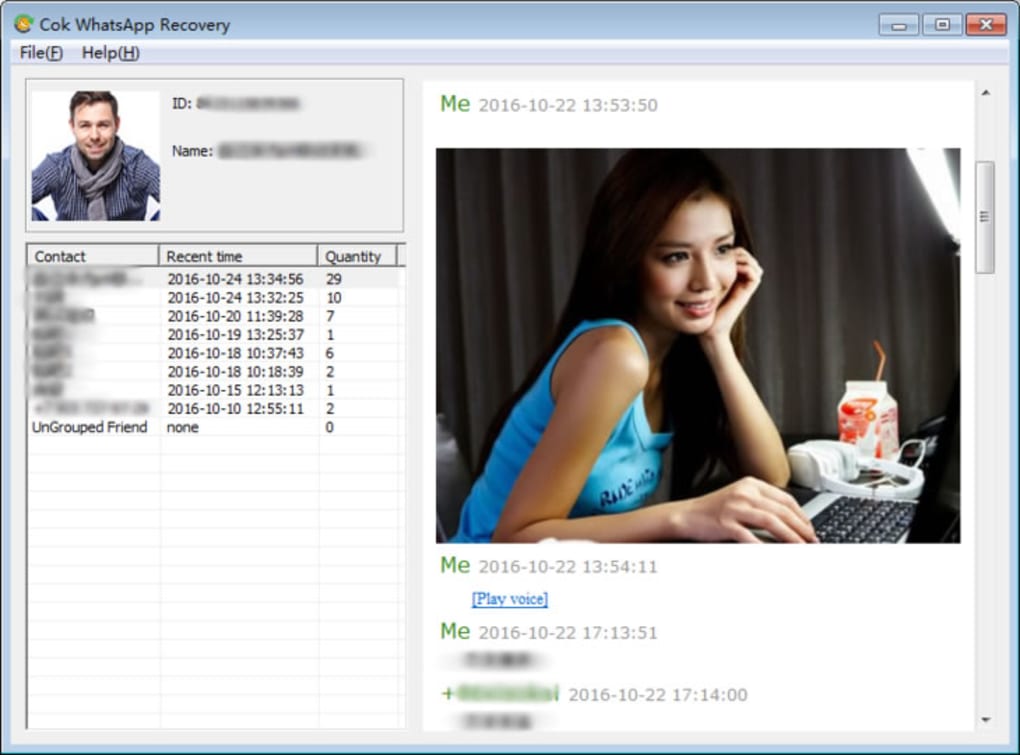
After installation, launch the application from the shortcut or Start menu. The main window greets you with a clean, English‑only interface that consists of three primary tabs: “Select Backup,” “Preview,” and “Recover.” Click “Select Backup” to browse for the WhatsApp backup file you wish to scan. The tool supports both .db.crypt12 and older .crypt8 formats, as well as backup folders exported from the WhatsApp desktop client.
Scanning and Previewing Data
Once a backup is selected, press the “Scan” button. Cok WhatsApp Recovery will analyze the file for recoverable messages and media. This process typically takes less than a minute for standard backups. After scanning, the “Preview” tab displays a sortable list of chats, dates, and attachment thumbnails. You can expand any conversation to view individual messages and decide which parts you want to restore.
Recovering Your Data
When you’re satisfied with the preview, navigate to the “Recover” tab. Choose a destination folder on your PC (e.g., C:\RecoveredWhatsApp) and click “Recover Selected.” The software copies the chosen messages and media into organized subfolders, preserving timestamps and original file names. After the process finishes, you can open the folder to verify that all desired content has been restored.
Because the trial version is fully functional, you can repeat the process with multiple backup files without restrictions. If you find the tool meets your needs, consider purchasing the full license to unlock priority support and future updates.
Compatibility, Pros & Cons, FAQ, and Final Thoughts
System Requirements and Compatibility
Cok WhatsApp Recovery runs on any Windows operating system from Windows 2000 SP4 onward, including Windows XP, Vista, 7, 8, 8.1, and 10. The application is a 32‑bit program, which means it works flawlessly on both 32‑bit and 64‑bit Windows installations. Minimum hardware requirements are modest: a 1 GHz processor, 512 MB RAM, and at least 50 MB of free disk space for installation. No additional drivers or runtime libraries are needed, making the setup process virtually frictionless.
Pros and Cons
- Pros
- Dedicated to WhatsApp – no unnecessary features.
- Easy-to‑use interface suitable for non‑technical users.
- Preview mode reduces the chance of unwanted restores.
- Works offline, ensuring privacy of personal chats.
- Free trial provides full functionality without hidden costs.
- Cons
- English‑only UI may limit non‑English speakers.
- Trial version does not include batch processing for large numbers of backups.
- No built‑in cloud sync – all recovered files stay on the local PC.
- Lacks advanced filtering (e.g., date‑range search) in the free version.
- Support is limited to email for trial users.
Frequently Asked Questions (FAQ)
Can Cok WhatsApp Recovery restore messages from a deleted backup file?
The tool can only recover data that is still present in the backup file itself. If the backup file has been permanently deleted from your disk, the software cannot retrieve it. However, if the file is still on your drive but the messages inside were removed, the scanner may locate remnants of those messages.
Is the recovered data saved in its original format?
Yes. Text messages are exported as .txt files, while media such as photos, videos, and voice notes retain their original extensions (e.g., .jpg, .mp4, .opus), preserving quality and compatibility with standard viewers.
Do I need an internet connection to use Cok WhatsApp Recovery?
No. The application works entirely offline. An internet connection is only required if you decide to purchase the full license or download updates from the developer’s website.
Can I recover WhatsApp Business chats with this tool?
The current version focuses on standard WhatsApp backups. While many backup structures are similar, full compatibility with WhatsApp Business is not guaranteed. Users have reported mixed results, so it’s advisable to test a small backup first.
What happens after the trial period ends?
The trial version does not expire; it remains fully functional. The only limitation is that you won’t receive future feature updates or priority support unless you purchase a license.
Conclusion – Should You Download Cok WhatsApp Recovery?
If you’re looking for a straightforward, privacy‑focused tool to retrieve lost WhatsApp conversations on a Windows PC, Cok WhatsApp Recovery offers a compelling free entry point. Its dedicated feature set, preview capability, and offline operation make it a safe choice for both casual users and those handling sensitive messages. While the lack of multi‑language support and advanced filtering may deter power users, the pros outweigh the cons for anyone who needs a quick, reliable fix.
Ready to give it a try? Click the download button below, follow the simple installation steps, and start recovering your chats today. Remember, the trial version is completely free, so you have nothing to lose—except those missing messages.
Download Cok WhatsApp Recovery NowGuides & Tutorials for Cok WhatsApp Recovery
How to install Cok WhatsApp Recovery
- Click the Preview / Download button above.
- Once redirected, accept the terms and click Install.
- Wait for the Cok WhatsApp Recovery download to finish on your device.
How to use Cok WhatsApp Recovery
This software is primarily used for its core features described above. Open the app after installation to explore its capabilities.
User Reviews for Cok WhatsApp Recovery 0
No reviews found





